Wsh-Shell
Wsh-Shell is a lightweight, portable, and fully static shell interpreter written in C, designed for embedded systems. It requires no dynamic memory allocation and is built to run in constrained environments like microcontrollers, either bare-metal or under RTOS (e.g., FreeRTOS).
🚀 Features
- Cross-platform, Highly Portable — only one header file to include
- Modular Design — ability to disable submodules for memory footprint optimization
- Single State Structure — all shell state contained in a single
WshShell_tinstance - Static Memory Only — no
malloc, no heap; all buffers are statically allocated - Command-line Editing — supports cursor movement, character deletion, and insert mode
- Command Parsing & Options:
- Supports short (
-h) and long (--help) flags - Supports int, float, string and other option types
- Supports double-quoted strings
- Supports short (
- Multi-User Support — multiple users, groups, access rights, and more
- Group-based Access Control — each command belongs to one or more logical groups; users are granted access only if their group set intersects with the command’s group set
- Fine-grained Option Access Rights — every command option (-f, --reset, etc.) has an associated access flag (read, write, execute, admin); the shell enforces these permissions at runtime and reports mismatches
- Escape Sequence Handling:
- Parses VT100/ANSI sequences
- Supports arrow keys, delete, backspace, sound alerts, etc.
- Handles key combinations (Ctrl+C, Ctrl+D, etc.)
- Command History:
- Implemented as a circular buffer
- Efficient with hash-based integrity checks
- Navigable with arrow keys (↑, ↓)
- Autocomplete:
- Tab / double-Tab completion for commands and flags
- Interactive Command Mode — commands can take exclusive control over user input, temporarily suspending the shell and routing all data to a single handler
- Customizable PS1 Prompt — user-defined templates for prompt appearance
- Await Prompt — await for a specific key press; the "press ..." hint repeats only
WSH_SHELL_PROMPT_WAIT_HINT_RETRIEStimes before the wait goes quiet (the bell still answers every refused key), and Ctrl+C always escapes the wait - Different New Line Support - handle different terminals setup (
\r,\nor\r\n) - Passwords Stored Salted & Hashed — passwords are supplied and verified through a user-provided callback and always stored in a salted, hashed form; by default the module uses a lightweight Jenkins (non-cryptographic) hash, and no plaintext passwords are written to flash unless the integrator explicitly chooses to do so
- Command Option Validation — during command registration, the shell automatically checks for duplicate short or long option flags within the same command and triggers an ASSERT if duplicates are detected
- Persistent Login Session —
wsh --keep Nkeeps the current login valid across up toNreboots, so a watchdog reset or a firmware crash does not force a re-login; the descriptor is integrity-hashed and lives in integrator-supplied storage (typically no-init RAM), the budget is a plain reboot counter so no RTC is needed, and while a session is armed the integrator can block the inactivity auto-logout; gated byWSH_SHELL_SESSION - Subcommand Trees — commands can nest subcommands (
user list,user whoami, etc.) with per-level access control, recursive validation, autocomplete that descends the tree, and automatic help listings; gated byWSH_SHELL_SUBCOMMANDSso flat-command builds pay no cost
🐍 Python adapter
Repository also includes a Python adapter for connecting to wsh-shell, running commands, and parsing responses from a host machine.
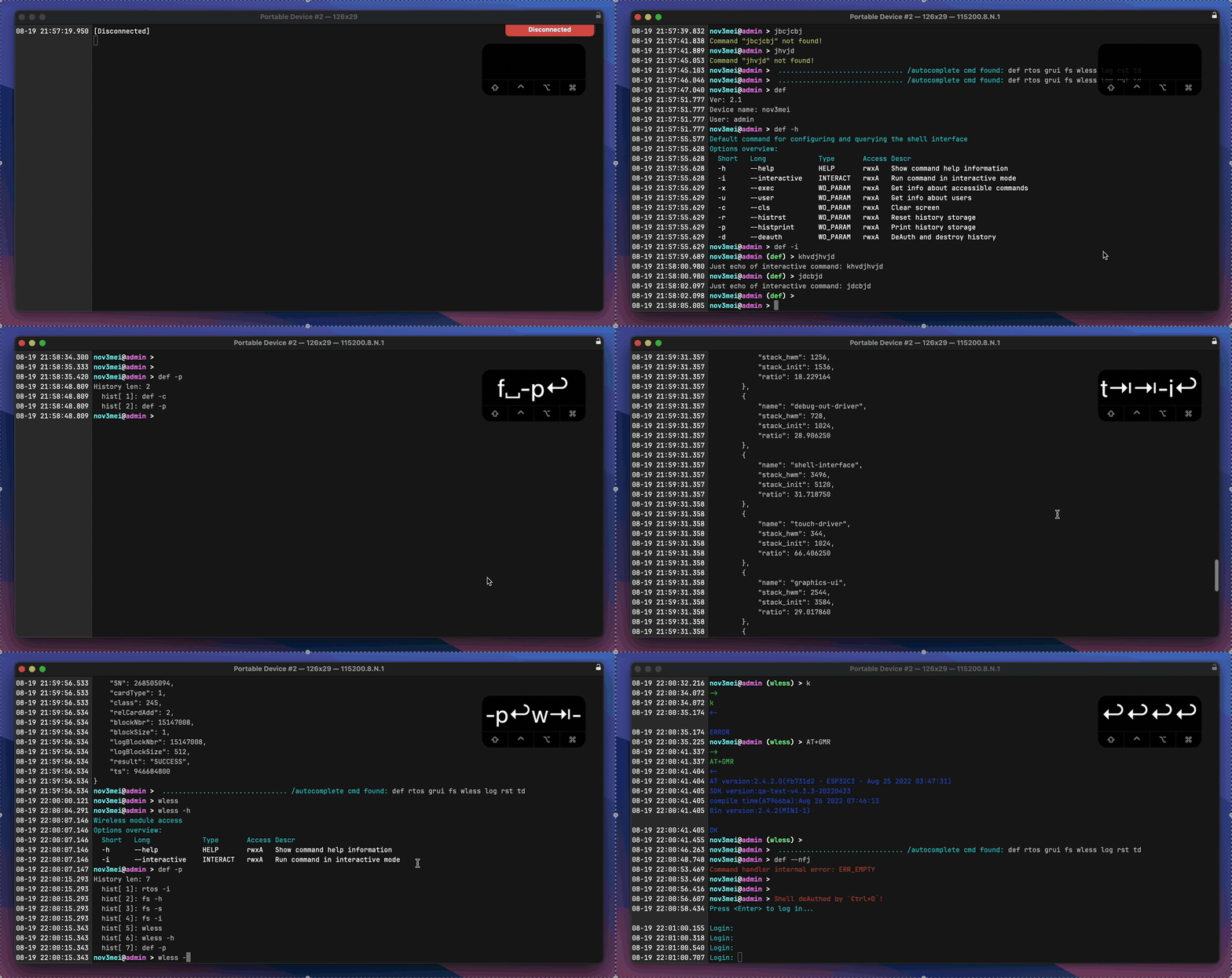
👾 Demo
💾 Memory footprint
Measured with utils/measure-footprint.py: the library is built for cortex-m7 with -O1, linked with --gc-sections, and only the bytes belonging to the shell's own object files are counted (libc, startup code and the integrator stub are excluded).
- Build options: cortex-m7,
-O1optimization, arm-none-eabi-gcc 14.2 - sizeof(WshShell_t) = 352 bytes (full config, 32-bit target)
| Config | FLASH, KB | ΔFLASH, KB | RAM, KB | sizeof(WshShell_t), B |
|---|---|---|---|---|
| All features disabled | 5.87402 | — | 1.61621 | 352 |
| +WSH_SHELL_PRINT_SYS/INFO/WARN/ERR | 8.44531 | +2.57129 | 1.61621 | 352 |
| +WSH_SHELL_INTERACTIVE_MODE | 8.77539 | +0.33008 | 1.61621 | 352 |
| +WSH_SHELL_HISTORY | 9.88281 | +1.10742 | 1.61621 | 352 |
| +WSH_SHELL_AUTOCOMPLETE | 12.55762 | +2.67480 | 1.61621 | 352 |
| +WSH_SHELL_PS1_CUSTOM | 13.10547 | +0.54785 | 1.58496 | 352 |
| +WSH_SHELL_PROMPT_WAIT | 13.54004 | +0.43457 | 1.58496 | 352 |
| +WSH_SHELL_DEF_COMMAND | 15.91211 | +2.37207 | 1.58496 | 352 |
| +WSH_SHELL_SESSION | 16.90918 | +0.99707 | 1.58496 | 352 |
| +WSH_SHELL_PRINT_OPT_HELP | 17.47559 | +0.56641 | 1.58496 | 352 |
| +WSH_SHELL_CMD_PRINT_OPT_OVERVIEW | 18.20801 | +0.73242 | 1.58496 | 352 |
| +WSH_SHELL_SUBCOMMANDS | 24.60840 | +6.40039 | 1.58496 | 352 |
The Δ column is what the row's flags add on top of every row above it, so a number is only meaningful together with its predecessors.
Important
--mode drop is the number to trim flash by. It rebuilds the full configuration
with one feature removed, so it answers the only question that matters in practice —
"what do I actually save by switching this off?" Feature costs are not additive:
code is shared between features, and a flag that looks cheap on a bare build can be
the most expensive one in a full build (WSH_SHELL_SUBCOMMANDS: ~0.6 KB alone,
~6.4 KB once the default wsh command tree exists).
⌨️ Code counting
👨💻 Authors
- abalyberdin@whoosh.bike — initial MVP
- vignatov@whoosh.bike — improvements, refactoring
- akrestinin@whoosh.bike — project separation (for submodule usage), main structure, PC/MCU examples
- sshilin@whoosh.bike — UX improvements, extra features, documentation, public release
- eshamaev@whoosh.bike — CI/CD, docs deployment, high-level PC command app
⚖️ License
This project is licensed under the MIT License.
You are free to use, modify, and distribute this software in both commercial and non-commercial projects, provided that the original copyright notice and this permission notice are included.